

ISO27001 explained – A7 Physical controls
| Sieuwert van Otterloo |
Security
In this article, we explain the new ISO 27002:2022 chapter 7 – Physical controls. This covers the controls necessary to protect information from physical threats. This is the third article in a series of four, each article covering one chapter:
- organization controls (chapter 5)
- people controls (chapter 6)
- physical controls (chapter 7) – This article
- technological controls (chapter 8)
In the ISO 27002:2013 version, these controls were mostly in chapters 8 and 11. As described in this overview article, a few new controls have been added in 2022. A detailed explanation of the previous controls can be found in this blog post.
Learn faster on our YouTube channel
You can also learn how to implement organizational controls directly from our full ISO 27001 course on YouTube. Discover the other chapters on our YouTube channel that covers all the ISO27001 series.
Implementing Physical Controls
Physical controls (A.7) cover the non-digital events that still cause real security incidents: break-ins, theft, people tailgating into offices, cleaners entering server rooms, fires, floods, or simply laptops and storage media going missing. ISO 27001 includes 14 physical controls because physical reality can disrupt IT and expose information just as much as a cyberattack.
A practical way to implement A7 is to always think in three layers:
- Procedures (A71-A714): short descriptions of how you apply each control in your office/building – IS Procedures template
- Recurring activities: planned checks and maintenance (e.g., inspections, desk checks, alarm testing) – ISMS schedule
- Evidence: proof the controls work in practice (photos, logs, reports, invoices, tickets)
Physical security perimeter (7.1)
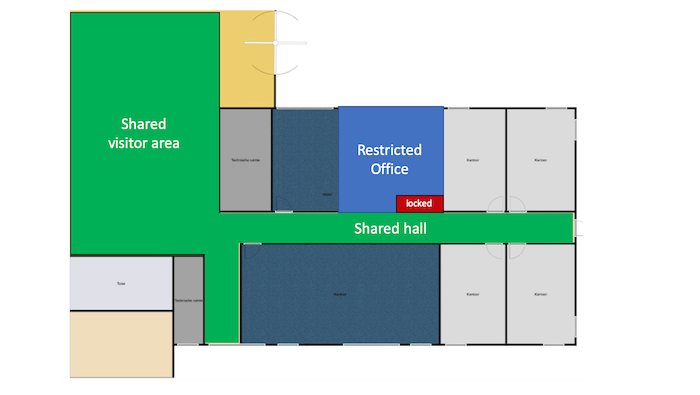
The first step when protecting a physical space is to define its perimeter. Sensitive or critical areas within the perimeter can then be identified. The perimeter must be sufficiently physically secure to protect the contents, with alarms and intruder detection systems. If necessary a monitored reception can control access. The image at the top of this article is an example of a zone plan showing perimeter and secure areas. In practice, you should color code the office perimeter zoning (green: shared, open to visitors; yellow: staff only; red: restricted storage/areas that are locked by default) and include it in your main Information Security Procedures document.
Evidence: your IS Procedures and example photos of the protected zone, such as a locked server room
Physical entry controls (7.2)
Only authorized persons should be able to gain entry to assets and information. The level of restrictions depends on the organizational requirements. For example, access rights to offices premises and storage should be part of your access register, such as which roles have keys (see A5). Things to consider include personal identification and logging who accesses the premises. A procedure should be in place for receiving visitors to establish their identity, where they are can go and if they must be accompanied. This is best to describe in the IS Procedures whereby you can state that visitors are accepted only by appointment or handled at the reception. Deliveries also present a risk, both because delivery areas need to be secured and to prevent delivery personnel entering restricted areas. If a front desk is available, state in your procedure that the package are left at the reception and only employees are allowed to pick it up.
Evidence: your asset/access register with owners of keys and IS Procedures
Securing offices, rooms and facilities (7.3)
Offices need to be secured with digital or physical keys. In general, detailed directories and maps should not be openly accessible as these can highlight the location of sensitive assets. In practice, this control complements A7.2 with implemented physical security measures such as door locks with keys/badges/access codes, reinforced windows, blinders and the presence of an active security alarm.
Evidence: your IS Procedures, physical evidence, office building contract specifying the alarm systems
Physical security monitoring (7.4)
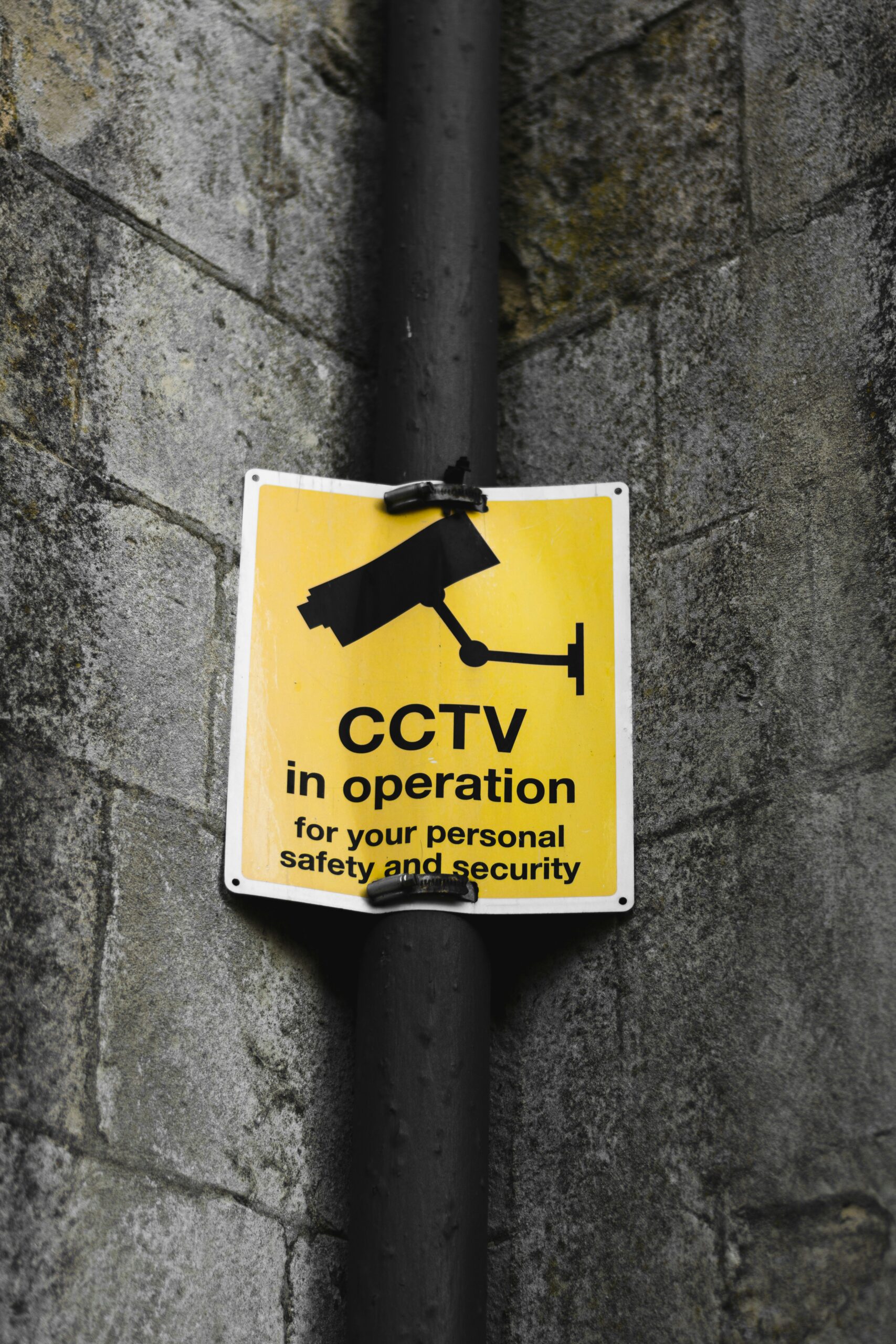 Monitoring can deter intruders and detect intrusion. Guards, cameras and alarms all monitor against unauthorized access. The design of any monitoring system should be considered confidential. Regular testing is required to ensure that the system works. Document how the monitoring is implemented, for example, the building administration manages the CCTV and be ready to show the relevant extract from the building lease agreement. Be sure the CCTV signage is displayed in monitored areas. Camera surveillance systems and other monitoring systems that collect personal information or may be used to track individual may require special consideration under data protection laws. For example, camera surveillance may require a data protection impact assessment under GDPR legislation.
Evidence: your IS Procedures, building agreements, physical evidence
Protecting against physical and environmental threats (7.5)
Natural or manmade disasters and physical attacks threaten information security and business continuity. The level of these risks is highly dependent on location. Floods, fires and large storms are the most likely risks, but the risk from earthquakes, civil unrest and terrorist attacks can also be considered in risk assessments. In practice, you can reason in your IS Procedures that your provide company smartphones and laptop that allow employees to work remotely (e.g., cloud + remote work).
Evidence: IS Procedures, building agreement on fire safety (usually mandated by law)
Working in secure areas (7.6)
The existence and purpose of secure environments should only be shared on a need-to-know basis. They should be kept locked, with access limited to authorised persons. Generally, lone-working should be discouraged, for both safety and for security purposes. Document how specific procedures if you need to use specific secure areas such as a server room. Access should be part of your access matrix with role-based access control (RBAC) with dedicated keys/codes.
Evidence: IS Procedures, topic-specific procedures for the special secure area
Clear desk and clear screen (7.7)
Sensitive information left on desks, screens, printers and whiteboards can be accessed by anyone. A clear desk and screen policy defines how and where information can be accessed. A basic policy includes no printed documents left unattended, either at workspaces or printers (clear desk) and locked device screens (clear screen). More detailed policies may be required for sensitive information, for example that information cannot be viewed on a screen in an open environment. Describe these rules and make it part of your staff IS rules.
Evidence: IS rules with onboarding acknowledgement, office tour
Equipment siting and protection (7.8)
Careful siting of equipment can minimize a host of risks: not just unauthorized access but also the risks due to environmental factors, spilled food and drink, vandalism, and degradation due to light or humidity. The protection required will depend on the sensitivity of the equipment. In practice, document in the IS Procedures that the equipment in your office (router, printer) is protected from unauthorized access. Document the common sense rules for equipment. For example, that is fixed servers fixed on racks, appropriate cable management or ventilated areas for a NAS outside a cabinet.
Evidence: IS Procedures and physical evidence
Security of assets off-premises (7.9)
Devices, including private devices (bring-your-own-devices), still need protection when they leave the premises. Basics include appropriate physical protection such as covers and theft prevention by not leaving devices unattended. The organization should be aware of what devices are used off premises, by whom, and what information is being accessed or used when off-site. Document your requirement in the IS staff rules by which employees acknowledge they should handle equipment with care when travelling, such as not leaving them unattended in public spaces, require the use of keyed locks or storing laptops in cabin luggage during air travel. Having device encryption on by default is also worth mentioning in the procedures.
Evidence: acknowledged IS staff rules
Storage media (7.10)
Information stored in any media format brings the risk of unauthorized access, and loss of information integrity through modification or degradation, loss, destruction or removal. Media should therefore be safely stored and eventually securely destroyed. Policies governing the management of removable media should cover what information can be stored on removable media, the registration and tracking of such media, how it should be safely stored to prevent unauthorised access or degradation, and how it should be transported. When storage is no longer required, secure destruction is necessary. Be sure to keep a register of disposed media in accordance with your procedure (this may be performed by an external party). The easiest rule is often to forbid the use of USB drives and communicate it vi awareness (e.g., use only alternative digital channels). Otherwise, describe a procedure where you discretionary allow use of USB sticks by explicit permission of email to the CISO/IT team. Make sure to keep track of this process.
Evidence: IS staff rules and IS Procedures, evidence of explicit provision of media
Supporting utilities (7.11)
Power failures can immediately compromise business’s activities. Less obviously, telecommunications and air conditioning will all interrupt digital activities, and failures of gas, sewage or water supplies will prevent employees from working on-site. Inspection and alarms systems can identify actual or potential failures. Continuity plans should identify back-up options and emergency contact details for service providers. Practically, you can install an UPS for critical systems or monitoring devices where relevant such as humidity in the server room. However, be sure to have a tracked procedure to maintain this equipment (7.13). On top of this, add the link to your continuity fallback in your continuity planning, such as remote work.
Evidence: IS Procedures, physical evidence, utility provider contact list (often part of building lease agreements/administration)
Cabling security (7.12)
Information and data are transferred via cables, while computers, security systems and environmental controls all require power, supplied by cabling. The former can be intercepted and outages of either can compromise information security and business continuity. The degree of security required depends on the organization, and in many cases will be managed by building facilities providers or telecoms and utilities companies. Basic protections include using cabling conduits or cable floor covers to prevent damage, and locked access to utility access and entry points. As with previous controls (7.8 and 7.11), these aspects are often managed by the building administration. Describe the “good housekeeping” rules in your main procedures document, like the floor router protected housing. If you need cabling, implement dedicated/shielded paths and mention encryption in transit for these communications lines.
Evidence: building/facilities responsibility documentation; when relevant, photos of physical evidence, cable labeling
Equipment maintenance (7.13)
Equipment maintenance introduces two information security considerations: poorly maintained equipment risks the loss of information; while equipment servicing or maintenance can expose information to external or unauthorized parties. Regularly serviced and updated equipment is less likely to require riskier repairs or to lead to outages. When repairs are required, care should be taken in choosing service providers and checking their work. Use your asset register to list devices that need maintenance. Keep a specific procedure for devices that you maintain on your own, such as an office router, with firmware updates. If you are using UPSs, include their maintenance since batteries neglect can be a fire hazard.
Evidence: scheduled maintenance in the ISMS calendar + completed maintenance proof, documented procedure in the IS Procedures/specific procedures
Secure disposal or re-use of equipment (7.14)
Equipment that is no longer in use may still have licensed software installed or stored sensitive data. This also applies to equipment that requires repair, and should be a consideration when deciding whether to use external repair services. Standard delete functions may not be adequate to remove sensitive information. Instead, specialist destruction, encryption/overwriting methods reduce the risk of residual information remaining on the storage media. If reusing, store devices securely and the wipe them with appropriate software. Remember to remove physical labels or markings too!
Evidence: keep logs of wiping (e.g., a photo of the device screen before and after wiping), vendor invoices, documented procedure in the IS Procedures/specific procedures
Each control measure in ISO 27002:2022 has guidance and implementation suggestions beyond what is summarised in this article. For further information, we therefore recommend reading the norm itself. For a summary of the other chapters in ISO 27001:2022, please visit out blog posts on chapter 5 – organisational controls, chapter 6 – people controls and chapter 8 – technological controls. Also, check our YouTube channel.
Picture source: Photo by Rob Coates on Unsplash

Dr. Sieuwert van Otterloo is a court-certified IT expert with interests in agile, security, software research and IT-contracts. He is a also an ISO 27001 and NEN 7510 auditor and AI researcher.